Assistive Technology Lending Library
The Assistive Technology Lending Library is a key initiative designed to promote inclusion and accessibility across Telford and Wrekin schools. Our vision is simple: every learner, regardless of ability, should have equitable access to the curriculum and the opportunity to thrive. Assistive Technology (AT) plays a vital role in removing barriers to learning for pupils with special educational needs and disabilities (SEND), enabling them to participate fully, achieve their potential, and develop independence.
Through the Lending Library, mainstream schools can borrow a wide range of assistive tools and trial licences before committing to purchase. This “try before you buy” approach ensures that technology is tailored to individual needs and embedded into everyday classroom practice. Available resources include:
- Digital tools such as text-to-speech, speech-to-text, and laptops.
- Specialist software like Clicker, DocsPlus, and Widgit for literacy and communication support.
- Devices and equipment including scanning pens, switches, and alternative input devices for pupils with complex needs.
Schools will also have access to training and guidance to help staff identify appropriate AT solutions and integrate them seamlessly into teaching and learning. Our aim is to make AT a core component of the universal offer, not an add-on, so that pupils can access the same curriculum as their peers.
By using the Lending Library, schools can:
- Explore innovative tools that foster independence and confidence.
- Support personalised learning plans for pupils with diverse needs.
- Embed inclusive practice across all educational settings.
Available equipment
- Clicker
- Docs Plus
- iPads
- Exam Reader Pens (Please note: this is an exam reader pen. If you require an everyday reader pen, please contact Scanning Pens directly to arrange a free trial.)
- Voice Pads
- Rainbow Recorders
- Laptops
- Switch toys
- Talking Mats (Once training has been delivered.)
Following a successful loan of the voice recorders or switch toys please see Inclusive Technology for purchasing this equipment.
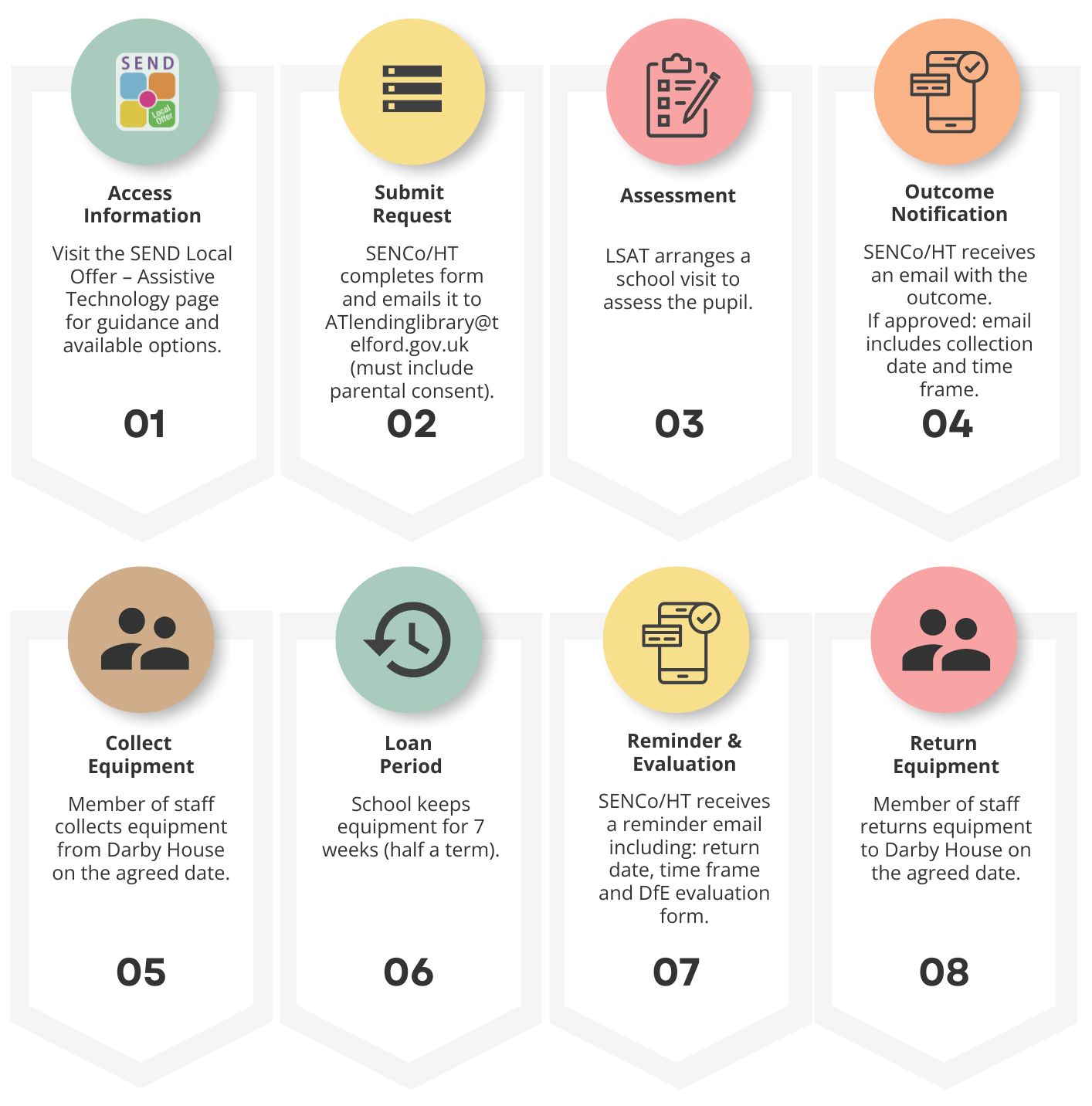
How to make a request
To make a referral please email the parental consent and information sheet to [email protected].
Resources
Additional training and resources
Crick Software
Throughout your pilot period, we have lots of resources on hand to help you get the most out of Clicker/Docsplus. Here you will find videos, guides and resources to support you with using Clicker/Docsplus with your pupils during your pilot.
If you experience any technical issues during your loan period, you can contact Crick directly via:
Contact support or [email protected]
Please note: When getting in touch regarding an issue with your active Clicker or Docsplus license, please mention that your enquiry relates to a license provided through Telford & Wrekin’s Assistive Technology Lending Library. This helps their support team know exactly where to look, allowing them to assist you much more quickly.
Scanning Pens
Visit Scanning Pens Traning Hub to get the most out of your device during your trial period. Explore quick tutorials to help you scan, read, translate, and troubleshoot with ease.
If you are experiencing any issues or would like to find out more information. You can contact them directly via:
(General enquiries) [email protected] or (Product support) [email protected]
Frequently Asked Questions
How long does it take for an LSAT visit to be arranged?
An LSAT will contact you as soon as possible to arrange a mutually convenient date for the visit.
What does the assessment involve?
The assessment will vary depending on the equipment being considered. The LSAT may work directly with the child, see samples of their work where appropriate, and discuss the child’s needs with the class teacher.
How many requests can a school submit?
There is currently no limit on the number of applications a school can make. However, this may change in the future depending on demand.
If we are submitting applications for multiple children, do we need a referral form for each one?
Yes. A separate referral form must be completed for each child.
If the LSAT has already recommended equipment, do we still need to submit a referral form?
Yes, a referral form is still required. However, in these cases, an additional LSAT assessment will not be needed.
Is the service only available for school-aged children?
The Assistive Technology Lending Library is available to mainstream primary and secondary pupils.
Can LSATs provide advice on how to use the equipment?
LSATs can answer questions, but it is recommended to use the free training provided by the equipment suppliers for detailed guidance.
Which budget should schools use to purchase equipment?
Trials through the library are free. Any equipment a school chooses to purchase afterwards would need to be funded from the school’s own budget.